
Our platform is constantly evolving to make working with your website easier.
We are now introducing the Front-end Editor – a smart tool that allows you to edit content directly on the page, without having to switch to the admin interface.
This feature provides a more convenient, faster, and visually clear way to manage your website.
What is the Front-end Editor?
The Front-end Editor allows you to make content changes directly from the visitor’s view of the website.
Simply switch to edit mode, click the desired element, and immediately update text, images, or block content.
There’s no need to navigate a technical environment or know any code – everything works intuitively and clearly.
Main benefits
Instant feedback: You see changes exactly as they will appear to visitors.
Time saving: No need to switch between the editor and the page preview.
Easy to use: A clear and modern interface suitable even for non-technical users.
Consistent design: Changes respect the website template and design.
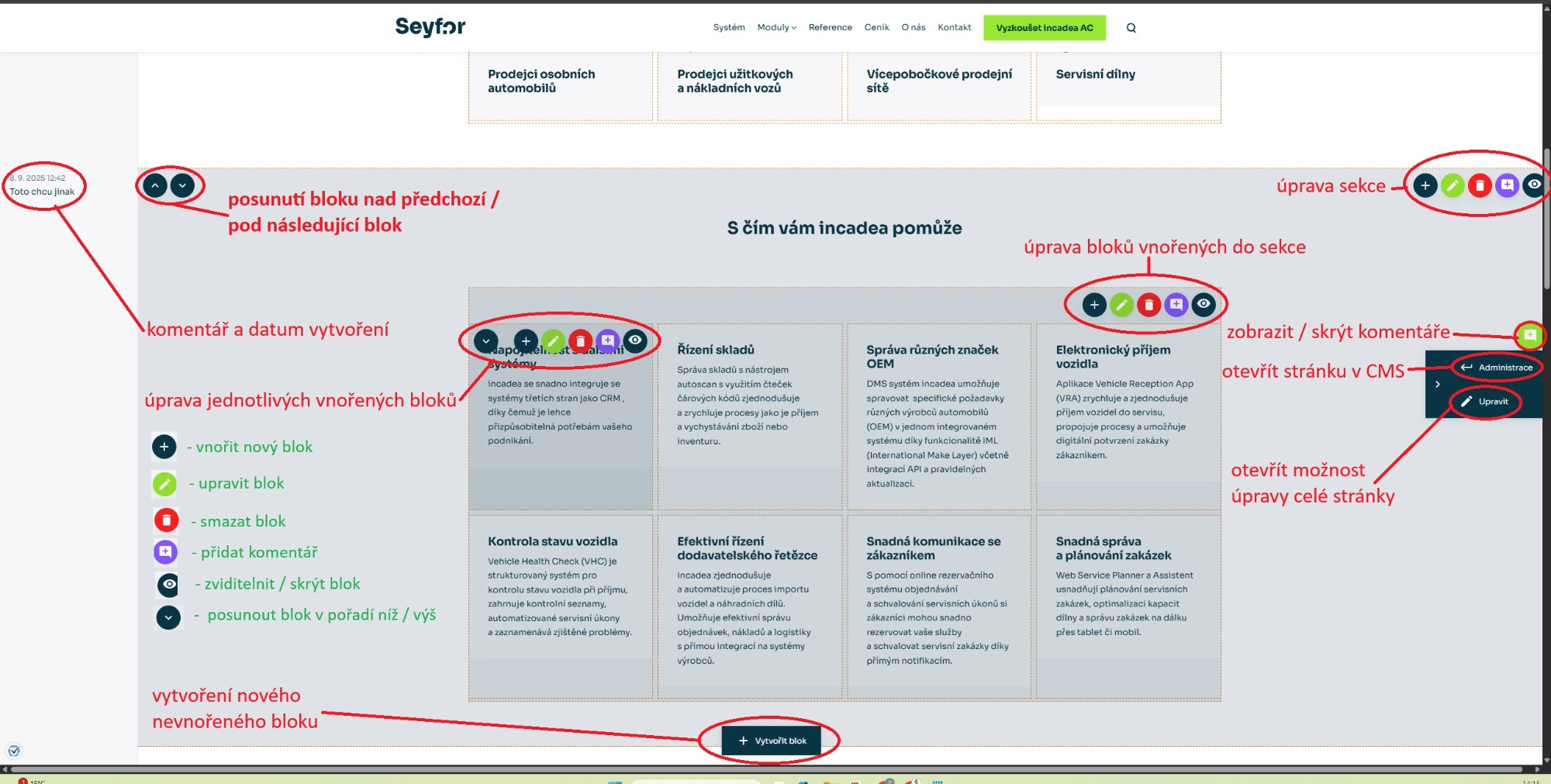
How it works in practice
- Log in to the CMS
- In the top bar, enable “Front-end Editing”

- Go back to the page (Visit pages)
- Edit

Operating requirements
You must have the latest system version with this module included.
Proper user permissions are required.